


HCA Florida Mercy Hospital: FLBMIA Market / Broward/Mercy (FLB)
HCA Florida Northwest Hospital: FLBMIA Market / Broward/Mercy (FLB)
HCA Florida University Hospital: FLBMIA Market / Broward/Mercy (FLB)
HCA Florida Palms West Hospital: Expanse (Button Manager)
HCA Florida Lawnwood Hospital: Expanse (Button Manager)
HCA MIS System: COCMIA
NICU TeleConsult Program
Resources and Training Materials Listed by Organizations
Click on the organization's name to view info, documents, and videos.
Clarus Care (Paging)
Clarus Care is the paging solution that affiliate hospitals will use to submit requests for consults.
Login Link
If you have trouble logging in to Clarus, or need your login information, please contact:
- Clarus 24/7 Support line: (615) 375-4500
- Telehealth team (available Monday-Friday from 8:00am-4:30pm, excluding holidays) via email: Telehealth.Office@nicklaushealth.org
- Your Practice Administrator
Support/Contacts
- Support team 24/7 email at Support@claruscare.com
- Support line 24/7 by phone: (615) 375-4500
- Support page with dashboard and app help resources: Manage Dashboard and App Help Resources
- Enter support ticket at: Enter Support Ticket
Onboarding/Getting Started
- Clarus Mobile App Guide
- Clarus Dashboard Guide (Note: this is only applicable to Calendar Owners / Practice Administrators)
Training
Baptist Health
Login Link
Support/Contacts
For support with EMR documentation, email the Clinical Informatics Team at Clinicalinformatics@baptisthealth.net
To reset your Baptist EHR password online, visit Password Reset
- Baptist Help Desk - Provider 24/7 Support Number: (833) 764-2156
- Press 1 - Provider Password resets, Remote Access, Multi-factor Authentication or Hardware Issues
- Press 2 - All other issues + Office Staff and Scribes
- Email: DGTDEHRSustainment@baptisthealth.net
Note: Baptist teleconsults will occur via Zoom, between the Baptist neonatologist and NCH affiliated subspecialist.
Onboarding/Getting Started
Training modules must be completed in CME prior to receiving access. Start with Accessing Cerner EHR Training PDF document for instructions in the Training section below.
After you have been credentialed & completed training, please contact the EHR Sustainment Team to set up your remote Cerner access and Cerner Apps: Powerchart, Secure Messaging and Camera Capture. Refer to the support contact information above.
Remote Access Setup Instructions - Remote Access Setup Instructions
Training
All of Baptist's Training Videos/Modules are available via the CME platform. Consulting physicians can take the 'Consultant Module' courses listed below.
- Accesing Cerner EHR Training
- Create a CME account
- How to enroll in courses on CME
- Consultant - Clinical Informatics (CERNER)
- Frequently Asked Questions
Files
EMR Mobile App Access
Overview
The EMR Mobile App can be used to make it easier to access patient information while documenting clinical notes. Note-writing functionality is available at some facilities and may allow users to enter documentation directly into a patient’s medical chart.
A list of facilities that support mobile note entry, along with any required instructions, will be provided below. If you experience any access issues, please contact the facility’s IT support line for assistance.
Facility Availability
- Mount Sinai: Application not offered.
- Jupiter Medical Center: Application not offered.
- HCA Facilities: Application not offered.
- Naples Comprehensive Hospital: Offered but pending instructions from facility.
- Baptist Health: Application can be downloaded directly from the app store (Apple and Google). Access code will be needed, please contact the Provider Support Team available 24/7 at (833) 764-2156 option #2.
- Wellington Regional Medical Center: Application can be downloaded directly from app store: http://www.uhsemraccess.com. Providers will use their Cerner login and password. If any assistance is needed, please contact the Provider Support Team at (561) 798-8693. For further instructions, please click the following links:
Files
HCA Healthcare
Login Links
HCA's Telehealth - Teladoc (InTouch)
EMR Access - HCA Florida
Support/Contacts
Meditech/Expanse
For support with HCA's EMR/Meditech, contact the Provider Solutions Specialist (PSS) Team at (888) 561-6599.
For password resets or other issues accessing the EMR, contact HCA's 24/7 Help Desk at (888) 561-6599.
Teledoc
For support with HCA's Telehealth System, contact Teladoc's Techinical Assistance Center at (877) 484-9119.
Physicians can use Virtual Care Platform impromptu meeting feature instead of Teledoc if video visit is required. To access the platform, go to Nicklaus Pediatric Virtual Care. To create an impromptu meeting, click on “Create Impromptu Meeting” at the top right and fill out the required fields.
The Teladoc Health Telehealth Network is supported 24/7 and can also be reached via email at Email: TAC@TeladocHealth.com and by Teladoc Live Chat
Onboarding/Getting Started
For initial onboarding and training, please complete the following steps after you have been credentialed with HCA.
- Validate your EMR/Meditech system access by following the Remote Access Setup steps (only requires to be set up one time). Meditech log-in credentials are provided after completion of HCA's Meditech training. - HCA Remote Access Setup (VDI) file on site currently under Files section.
- Teladoc will send providers a welcome letter via email. Access the email from Teladoc which includes your unique Teladoc username and a link to Reset your Password.
- Access the Software Center to download the Teladoc software on your computer - HCA Teladoc Software Download
- Validate your ability to access Teladoc with the provided username and your newly reset password - https://portal.intouchcustomer.com/
- Review all of the training files/videos linked in the subsection below
Training
EMR/Meditech - Files
Note: To access PatientKeeper, go to Meditech and click on the icon for PatientKeeper.
Expanse Tip Sheets (Coming Soon (May 9th, 2025). Expanse EMR implemented at Palms West and Lawnwood hospitals.)
EMR/Meditech - Video Tutorials
- Basics and Navigation
- Clinical Review
- Signing Orders & Notes
- Physician Documentation
- Admission Orders
- Order Sets
- Non-Med Order Entry
- Med and Fluid Orders
- Transfer Orders
- Discharge Plan
Teladoc/InTouch - Files
Teladoc Training Video
- Teladoc Training Video - Provider Access Software: Desktop App
Jupiter Medical Center
Login Link
Support/Contacts
- Physician Support Line (for all EMR access issues): (561) 263-5600
- Password resets, remote access problems, or login issues should be directed to the Physician Support Line at the same number.
Onboarding/Getting Started
Training modules must be completed prior to receiving EMR access. After completion, physicians will use their assigned username (Pnumber@jupitermed.com) and the password created during EPIC training.
Training
All Jupiter Medical Center training videos and modules are available through the EPIC training platform. Instructions for remote EPIC access and clinical documentation workflows are included in the Files section below.
Files
Mount Sinai Medical Center
Login Link
Support/Contact
For support with your Login ID, password resets, or other login issues, contact the Mount Sinai Service Desk at 305-674-2545.
For support with the Epic SinaiLink EMR, contact Mount Sinai's Clinical Informatics team at 305-674-2638.
Onboarding/Getting Started
For initial onboarding and training, please:
- Review the Epic Sinai Link Consult Note Workflow Tip Sheet
- Watch the Epic Sinai Link Consult Training Video
- Log in to Epic - Physicians received an email from Mount Sinai. The email includes a link, personal Login ID (your 4-digit code), and temporary password: Welcome1234!. You will be prompted to change the password. The Mount Sinai link is https://sinailink.msmc.com
Note: Mount Sinai is a Telephone (audio-only) consultation service, between the Mount Sinai neonatologist and NCH affiliated subspecialist.
Files
Videos
Specialty Coverage by Facility
TeleNICU Subspecialty Services by Facility in 2025
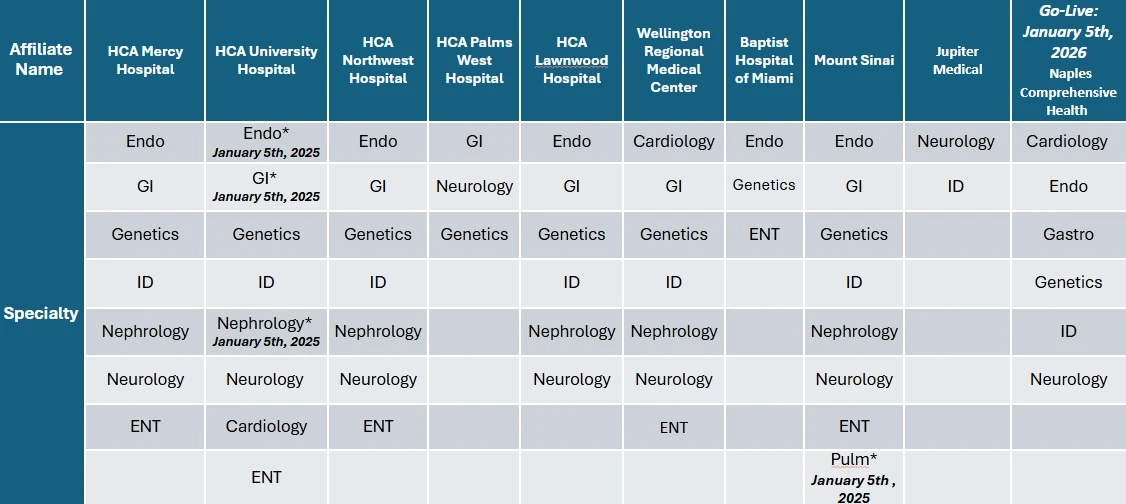
TeleNICU Subspecialty Services by Facility – 2025 overview.
Specialty Note Templates
Files
Wellington Regional Medical Center
Login Link
Support/Contacts
- For support with Wellington’s EMR, contact their Clinical Informatics team at (561) 798-8693 or via email at Wellington.IS@uhsinc.com
- For support with Wellington’s Telehealth system, contact (561) 472-2501 or email Wellington.IS@uhsinc.com
- For urgent after-hours support, please contact the Facility night supervisor at (561) 798-8625.
- For password resets or any other support, contact Wellington’s Help Desk at (561) 798-5622.
Onboarding/Getting Started
For initial onboarding and training, please:
- Follow the Citrix Installation Link & Instructions. Supported browsers for the EMR system are Google Chrome or Microsoft Edge.
- Validate your EMR system access by following the instructions in this file: Cerner-Fusion Login 2-Factor Authenticator Tip Sheet
Note: Wellington teleconsults will occur via Zoom between the Wellington neonatologist and NCH affiliated subspecialist.
Files
Virtual Care Platform
Login Link
Nicklaus Pediatric Virtual Care – Doctors Dashboard
Overview
Physicians can use an impromptu meeting on the Virtual Care Platform when a video visit is required or requested. To create an impromptu meeting, open the Doctors Dashboard and click Create Impromptu Meeting at the top right, then complete the fields below.
How to Create an Impromptu Meeting
- Enter the Virtual Care Platform: Open the Nicklaus Children’s Hospital | Pediatric Virtual Care Platform (Doctors Dashboard link above).
- Click “Create Impromptu Meeting”(top-right) as shown in the screenshots below.

Doctors Dashboard – landing screen.
- Complete the fields:
- Patient First and Last Name: Enter the requesting provider’s information (not the patient).
- Parent Email Address: Enter the requesting provider’s email (do not enter a parent email).
- Parent Cell Phone: Enter the requesting provider’s callback or preferred phone number.
- Patient Date of Birth: Use default
01/01/2000. - Department: Enter your department.
- Provider: Enter your name.
- Schedule Date/Time: Ensure the time is within 24 hours of the initial consultation request.
- Start or Schedule: If the requesting provider is available now, click Create and Start. If for a future time, click Create.
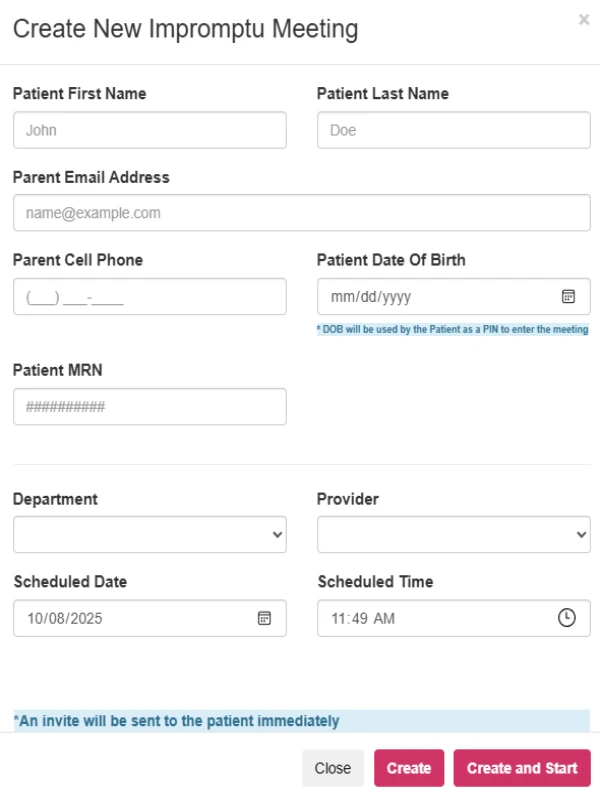
Location of the Create Impromptu Meeting button.
For support regarding the overall NICU TeleConsult program, credentialing, physician credentials to log in to the referring facility EMR,
and other inquiries, please contact the NCHS Telehealth team via email at Telehealth.Office@nicklaushealth.org.